The post Designing a Secure Remote Future with Windows Remote Desktop Protocol appeared first on CISO MAG | Cyber Security Magazine.
]]>By Mike Jumper, CEO and Co-founder of Glyptodon
They were right. Microsoft’s Remote Desktop Protocol (RDP), already a common target, has become even more heavily targeted. According to research from cybersecurity firm ESET, Windows RDP attacks rose an astounding 768% in 2020. In fact, malware like Trickbot now includes RDP scanners to search for open ports, and distributed denial-of-service (DDoS) attacks have been using RDP as a way to amplify their impact.
To be fair, the issue here is not RDP itself. RDP is a very useful and functionally rich protocol, and the open-source project I work on, Apache Guacamole, uses it internally with great success. The issue is the attack surface created by the position of the remote desktop service within the operating system. This can be eliminated with proper system design.
Protecting Privileged Services
To enable a user to operate a machine remotely, RDP requires administrator-level privileges. Should an attacker exploit a vulnerability and execute arbitrary code, that code will inherit those privileges. A successful attack against a privileged service can be catastrophic mainly due to the privileges the attacker gains once they control that service.
Two of the vulnerabilities found in 2019, popularly known as BlueKeep and DejaBlue, can be exploited to do just that on unpatched Windows servers with public RDP services. This can result in the introduction of malware, the initiation of a ransomware attack, and allow hackers to move laterally across the network and infiltrate other computers.
As a privileged service, RDP should always be carefully guarded and never exposed publicly. Instead, all access should take place through an entirely independent service, one with tight controls and limited privileges so that a successful attack cannot result in gaining administrator status
Protecting Against the Unknown
A system should never remain unpatched. The reasons why are basic and abundantly clear: older, unpatched software possesses known vulnerabilities. That said, the foremost concern amongst CISOs regarding remote access should be unknown vulnerabilities. When a new vulnerability emerges, it is not always possible to patch the system before the vulnerability begins to be exploited, and it’s on the system’s design to protect against this.
When hackers exploit a vulnerability, they perform an action that a software’s security model should otherwise deny. CISOs must be sure IT sets boundaries that can be enforced independently through layers of protective services while limiting privileges to only what is essential for operation. Respectively, these are known as defense-in-depth and the principle of least privilege.
Authentication and authorization should not just be a part of connecting with RDP, they should be preconditions that are satisfied before RDP is even available. To this end, a remote desktop gateway should be the only way in and should be positioned in front of RDP. The gateway should provide access strictly to remote desktops assigned to specific users, and should operate with limited privileges to ensure an attacker cannot directly gain admin control if the gateway is compromised.
Virtual private networks (VPN) have been a popular approach for overcoming these hurdles. Unfortunately, they have a reputation for being sluggish and difficult to use, and deploying so generic a solution like a VPN can open up access to more of the private network than each user needs. With so many employees likely to remain remote post-pandemic, VPNs are not likely to provide a feasible solution for securing RDP at the enterprise level.
After deploying the gateway, IT should lock down the network firewall so that the gateway is the only means to access RDP from outside the network. Likewise, computers on the network should be locked down so that they allow access to RDP only via the gateway. By isolating remote desktops at the network level, a single hacked computer doesn’t put all computers in jeopardy.
The Remote Future
For CISOs, securing RDP is simply a matter of ensuring that it’s deployed carefully so malicious actors have nothing to leverage. Place RDP services behind a secure gateway, apply patches in a timely manner, and follow best practices, and you’ll have a long-term solution for your remote future.
About the Author
 Mike Jumper is the original developer of Apache Guacamole, an open-source remote desktop access gateway. He is CEO and co-founder of Glyptodon, which provides a commercial build of Apache Guacamole with enterprise support.
Disclaimer
Views expressed in this article are personal. The facts, opinions, and language in the article do not reflect the views of CISO MAG and CISO MAG does not assume any responsibility or liability for the same.
The post Designing a Secure Remote Future with Windows Remote Desktop Protocol appeared first on CISO MAG | Cyber Security Magazine.
]]>The post What is an RDP attack? appeared first on CISO MAG | Cyber Security Magazine.
]]>What RDP attacks occurred in the past?
LabCorp (Laboratory Corp. of America) was hit by ransomware through an RDP attack in 2018. The ransomware infected thousands of PCs and almost 2,000 servers of this major medical testing facility. According to the Wall Street Journal report, the company was hit with a strain of ransomware known as SamSam. The hackers demanded $6,000 in bitcoin for each machine or $52,500 to unlock all encrypted devices, according to the alert from the National Health Information Sharing and Analysis Center, which coordinates health-industry responses to cyberattacks.
And earlier in the year, the Hartsfield-Jackson Atlanta International Airport, regarded as the world’s busiest by passenger traffic, was also hit by an attack involving SamSam.
In 2018, the Internet Crime Complaint Center (IC3) along with the U.S. Department of Homeland Security released an alert stating, “Remote administration tools, such as Remote Desktop Protocol (RDP), as an attack vector has been on the rise since mid-late 2016 with the rise of dark markets selling RDP Access.”
How do RDP attacks happen?
Microsoft software is used in over 90% of the world’s computers, and naturally, these have been widely targeted by hackers. We saw that with Internet Explorer, the Windows Operating systems released over the years, Windows Server software – and these days with Microsoft 365.
Microsoft introduced the Remote Desktop Protocol in 1996. Every Windows system since Windows XP uses RDP for remote connection. As employees became mobile and worked from different locations, there was a need to access corporate servers and workstations from remote locations. Two technologies emerged: VPN and RDP. But RDP is the more popular choice among users as it is built into Windows and offers more control of the host. An RDP client running on the user’s laptop or desktop (client) communicates with the RDP component on the server (host). And the communication between the two is encrypted (see illustration).
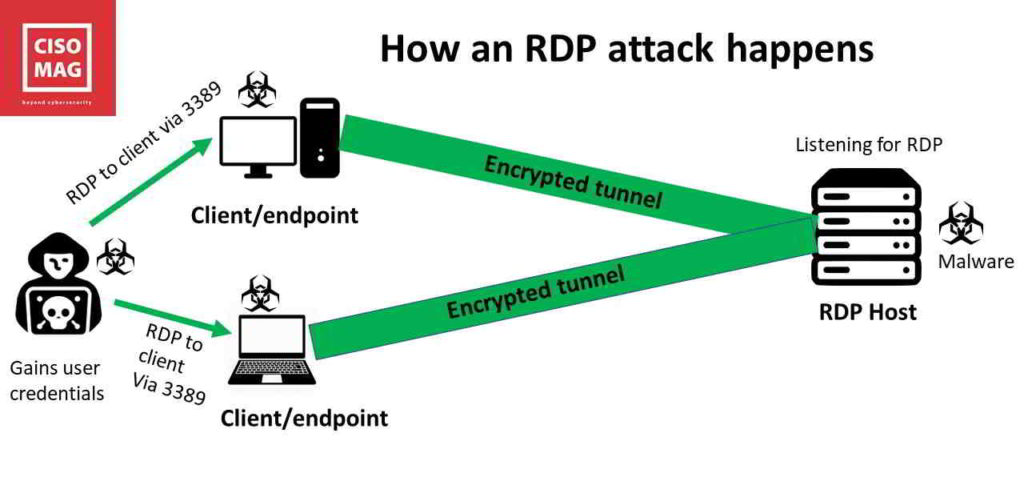
Ever since RDP was introduced, cybercriminals have been trying to hack into machines via this protocol – effectively launching a Windows RDP attack. RDP attacks continue to impact organizations worldwide to this day. Today, hackers are using RDP attacks to deploy ransomware and to lock up systems, severely crippling businesses – as in the LabCorp incident. These types of RDP attacks are becoming more common since they are lucrative.
RDP attacks occur through open RDP ports.
What is an RDP port?
A computer has hardware and software ports for communicating with other devices and services. Hardware ports are easier to understand as they are physical. Look at the sides of your laptop and you will see different hardware ports for connecting devices – USB ports, HDMI ports, the legacy VGA and Firewire (Apple); Ethernet (network) port, display port, lightning connector (Apple), Thunderbolt (Apple), the power port, etc.
Software ports are logical channels to services on networks. For instance, websites are accessed through port 8080 (http), file transfer is port 20 or 21, and send email is port 25 (SMTP). These are defined by communication protocols that are followed by the industry – http, FTP, TCP/IP, and SMTP are protocols.
Here is an analogy. Cable TV offers hundreds of channels coming down to us on a single wire. But all these channels have separate communication paths in that wire. Those are like ports. Think of ports as communication channels.
There are thousands of services to access on networks – printing, FTP/file transfer, file sharing, remote access, etc. A port (and a unique port number) is designated for service.
You have ports for Remote Access as well, and often, these ports are unsecured and open for anyone to use. Hackers scan connected devices for open ports, and once they find these, they can access the endpoints. The endpoints are connected to the corporate network via TCP/IP and other protocols. So once the hacker gets into your connected endpoint (laptop, tablet, phone) – they can easily get into the corresponding network and deploy malware like ransomware.
Why use Remote Access?
The most common example of remote access today is your IT engineer logging into your laptop from a remote location to fix an issue. They would use remote connectivity software like AnyDesk or TeamViewer to do that. This is through RDP.
Another example is a traveling employee who may want to access some files stored on his office computer, which is thousands of miles away. The employee could use either VPN or RDP to do that.
How do you block an RDP attack?
Ports have default numbers. If you keep the RDP port to 3389 (default), then it is a security threat, since hackers know about this port. So, if you plan to open up RDP ports for Internet access, the first thing to do is change the default port number from 3389 to a number above 10000. Or, if you want to keep using port 3389, make sure the port is closed down after a remote access session.
Hackers use port scanning software to determine which ports are open on the targetted system. You can use this software to see all the open ports on your system — and close these ports. But the first thing to do is to change the default port number for RDP.
Change the default port number
Follow these steps to change the RDP port:
- In Windows, go to Run –> Type: regedit to open the Registry Editor.
- Locate the following key:
HKEY_LOCAL_MACHINE\System\CurrentControlSet\Control\Terminal Server\WinStations\RDP-Tcp\
3. In the right-hand pane, double-click on PortNumber.
4. Change the value to Decimal and specify the new port number between 1001 to 254535.
5. Click OK.
6. Close the registry editor and restart your computer.
Warning: Do not try this if you are unfamiliar with the Window Registry and registry editing. Get your system administrator to do this for you.
Check if port 3389 is open and listening
You may open port 3389 to connect to a computer remotely and may forget to close it after the session. Or another user may have done this on a shared device.
Here’s how you can check if the port is open and listening:
- Open PowerShell by going to Run –> powershell
- Run the following command: tnc 192.168.1.2 -port 3389
- In this command, replace the IP address 192.168.1.2 with your computer’s IP. Replace it with your router’s public IP if you have allowed public access to your computer through the router. The resulting value of TcpTestSucceeded should be True.
You can also check the port using the command prompt or CLI (command line interface), but we will not discuss this here, as it is beyond the scope of this article.
Alternately, use a port scanning or vulnerability scanning tool like CurrPorts (NirSoft) that will scan all ports and list which ones are open.
Close port 3389 (if open)
This can be done either through the command line or through a utility like CurrPorts (NirSoft).

Exploiting RDP ports to deploy ransomware
If a hacker comprises your system via an open RDP Port 3389, to deploy malware or ransomware, they could do the following:
- Install a process that starts encrypting all docs, pdf, jpg, and several other file formats into a secure RAR archive form. After that, they could delete the originals.
- Install a Group Policy script that enables the Guest account, set an unknown password on it, and give it complete access to all administrative functions, including RDP. The script can be set to run on any user’s login (all profiles), so disabling the Guest account would only hold until the next session when the admin logs in.
- Lock the login screen for all users on the server with a ransomware scare tactic screen claiming to be from an authority like the FBI. The ransom fee, an email address, and the mode of payment will be shown on that screen.
- Uninstalled anti-virus and other security products.
- Delete all backups online or on the system.
- Disabled the F8 startup key to prevent booting into safe mode.
- Turn off Shadow Copies on all shares – and delete the historical stored revisions of files.
- Change other system configuration settings to make the system more vulnerable to attacks.
Well, this might shake one up, if they did not already know this! So, what are you waiting for? Close your open RDP port now!
Security policies & Best Practices
We also suggest a few more things to secure your systems:
- Use a secure VPN connection instead of RDP to access desktops remotely.
- Enforce the use of strong passwords and password change every 60 – 90 days.
- Set a threshold for password tries – the system should lock out the user after three failed login attempts (failed passwords).
- Change the default name of your Administrator account.
- Check your Group Policies frequently.
- Install all server patches and pay attention to Microsoft Patch Tuesday (Update Tuesday) announcements (and similar advisories).
About the Author
Brian Pereira is the Editor-in-Chief of CISO MAG. He has been writing on business technology concepts for the past 26 years and has achieved basic certifications in cloud computing (IBM) and cybersecurity (EC-Council).
The post What is an RDP attack? appeared first on CISO MAG | Cyber Security Magazine.
]]>