The post Hackers Target Microsoft Office Users in a New Zero-Day Attack appeared first on CISO MAG | Cyber Security Magazine.
]]>“An attacker could craft a malicious ActiveX control to be used by a Microsoft Office document that hosts the browser rendering engine. The attacker would then have to convince the user to open the malicious document. Users whose accounts are configured to have fewer user rights on the system could be less impacted than users who operate with administrative user rights,” Microsoft said in a security advisory.
ActiveX is a software framework from Microsoft that adapts its earlier Component Object Model and Object Linking and Embedding technologies for content downloaded from a network.
Zero-Day Flaw Discovery
The critical vulnerability CVE-2021-40444 was first discovered by exploit detection service provider EXPMON. The company stated that they found the issue after detecting a “highly sophisticated zero-day attack” targeting Microsoft Office users.
EXPMON system detected a highly sophisticated #ZERO-DAY ATTACK ITW targeting #Microsoft #Office users! At this moment, since there’s no patch, we strongly recommend that Office users be extremely cautious about Office files – DO NOT OPEN if not fully trust the source!— EXPMON (@EXPMON_) September 7, 2021


Mitigation
Microsoft stated that systems with active Microsoft Defender Antivirus and Defender for Endpoint (build 1.349.22.0 and above) are protected against the exploits of CVE-2021-40444. “Microsoft Defender Antivirus and Microsoft Defender for Endpoint both provide detection and protection for the known vulnerability. Customers should keep antimalware products up to date. Customers who utilize automatic updates do not need to take additional action. Enterprise customers who manage updates should select the detection build 1.349.22.0 or newer and deploy it across their environments,” said Microsoft in a statement.
Microsoft also confirmed that it will provide a security patch or an out-of-cycle security update after investigating the incident.
How Microsoft Plans to Protect Trusted Office Docs
Microsoft is also planning to boost the security of the Trusted Office Documents and prevent their misuse in malicious campaigns.
“We are changing the behavior of Office applications to enforce policies that block Active Content (ex. macros, ActiveX, DDE) on Trusted Documents. Previously, Active Content was allowed to run in Trusted Documents even when an IT administrator had set a policy to block it. As part of ongoing Office security hardening, the IT administrator’s choice to block Active Content will now always take precedence over end-user set trusted documents,” Microsoft stated.
The post Hackers Target Microsoft Office Users in a New Zero-Day Attack appeared first on CISO MAG | Cyber Security Magazine.
]]>The post Designing a Secure Remote Future with Windows Remote Desktop Protocol appeared first on CISO MAG | Cyber Security Magazine.
]]>By Mike Jumper, CEO and Co-founder of Glyptodon
They were right. Microsoft’s Remote Desktop Protocol (RDP), already a common target, has become even more heavily targeted. According to research from cybersecurity firm ESET, Windows RDP attacks rose an astounding 768% in 2020. In fact, malware like Trickbot now includes RDP scanners to search for open ports, and distributed denial-of-service (DDoS) attacks have been using RDP as a way to amplify their impact.
To be fair, the issue here is not RDP itself. RDP is a very useful and functionally rich protocol, and the open-source project I work on, Apache Guacamole, uses it internally with great success. The issue is the attack surface created by the position of the remote desktop service within the operating system. This can be eliminated with proper system design.
Protecting Privileged Services
To enable a user to operate a machine remotely, RDP requires administrator-level privileges. Should an attacker exploit a vulnerability and execute arbitrary code, that code will inherit those privileges. A successful attack against a privileged service can be catastrophic mainly due to the privileges the attacker gains once they control that service.
Two of the vulnerabilities found in 2019, popularly known as BlueKeep and DejaBlue, can be exploited to do just that on unpatched Windows servers with public RDP services. This can result in the introduction of malware, the initiation of a ransomware attack, and allow hackers to move laterally across the network and infiltrate other computers.
As a privileged service, RDP should always be carefully guarded and never exposed publicly. Instead, all access should take place through an entirely independent service, one with tight controls and limited privileges so that a successful attack cannot result in gaining administrator status
Protecting Against the Unknown
A system should never remain unpatched. The reasons why are basic and abundantly clear: older, unpatched software possesses known vulnerabilities. That said, the foremost concern amongst CISOs regarding remote access should be unknown vulnerabilities. When a new vulnerability emerges, it is not always possible to patch the system before the vulnerability begins to be exploited, and it’s on the system’s design to protect against this.
When hackers exploit a vulnerability, they perform an action that a software’s security model should otherwise deny. CISOs must be sure IT sets boundaries that can be enforced independently through layers of protective services while limiting privileges to only what is essential for operation. Respectively, these are known as defense-in-depth and the principle of least privilege.
Authentication and authorization should not just be a part of connecting with RDP, they should be preconditions that are satisfied before RDP is even available. To this end, a remote desktop gateway should be the only way in and should be positioned in front of RDP. The gateway should provide access strictly to remote desktops assigned to specific users, and should operate with limited privileges to ensure an attacker cannot directly gain admin control if the gateway is compromised.
Virtual private networks (VPN) have been a popular approach for overcoming these hurdles. Unfortunately, they have a reputation for being sluggish and difficult to use, and deploying so generic a solution like a VPN can open up access to more of the private network than each user needs. With so many employees likely to remain remote post-pandemic, VPNs are not likely to provide a feasible solution for securing RDP at the enterprise level.
After deploying the gateway, IT should lock down the network firewall so that the gateway is the only means to access RDP from outside the network. Likewise, computers on the network should be locked down so that they allow access to RDP only via the gateway. By isolating remote desktops at the network level, a single hacked computer doesn’t put all computers in jeopardy.
The Remote Future
For CISOs, securing RDP is simply a matter of ensuring that it’s deployed carefully so malicious actors have nothing to leverage. Place RDP services behind a secure gateway, apply patches in a timely manner, and follow best practices, and you’ll have a long-term solution for your remote future.
About the Author
 Mike Jumper is the original developer of Apache Guacamole, an open-source remote desktop access gateway. He is CEO and co-founder of Glyptodon, which provides a commercial build of Apache Guacamole with enterprise support.
Disclaimer
Views expressed in this article are personal. The facts, opinions, and language in the article do not reflect the views of CISO MAG and CISO MAG does not assume any responsibility or liability for the same.
The post Designing a Secure Remote Future with Windows Remote Desktop Protocol appeared first on CISO MAG | Cyber Security Magazine.
]]>The post Microsoft’s First Patch Tuesday of 2021 is Here! Know Which Flaws are Fixed appeared first on CISO MAG | Cyber Security Magazine.
]]>The January 2021 security release consists of security updates for the following software:
- Microsoft Windows
- Microsoft Edge (EdgeHTML-based)
- Microsoft Office and Microsoft Office Services and Web Apps
- Microsoft Windows Codecs Library
- Visual Studio
- SQL Server
- Microsoft Malware Protection Engine
- .NET Core
- .NET Repository
- ASP .NET
- Azure
According to the release, the Remote Code Execution (RCE) flaw in Microsoft Defender (CVE-2021-1647) is listed as the most severe bug which could enable threat actors to infect qualified units with arbitrary code.
“According to Microsoft, this vulnerability was exploited in the wild as a zero-day, though no further details have been shared. Considering how prevalent Microsoft Defender is, this flaw provides attackers with a large attack surface. Microsoft also patched CVE-2021-1648, an elevation of privilege vulnerability in the printer driver host, splwow64 due to improper validation of user-supplied data. The vulnerability is marked as publicly disclosed by researchers at Google Project Zero and through the Zero Day Initiative. While it is labelled as an elevation of privilege vulnerability, Microsoft states that it can also be used for information disclosure,” said Satnam Narang, Staff Research Engineer at Tenable.
The latest patches also fix other critical bugs like a memory corruption flaw in Microsoft Edge Browser (CVE-2021-1705), a Windows Remote Desktop Protocol Core Security feature bypass flaw (CVE-2021-1674), and five critical RCE flaws in Remote Procedure Call Runtime.
How to Install the Latest Security Updates
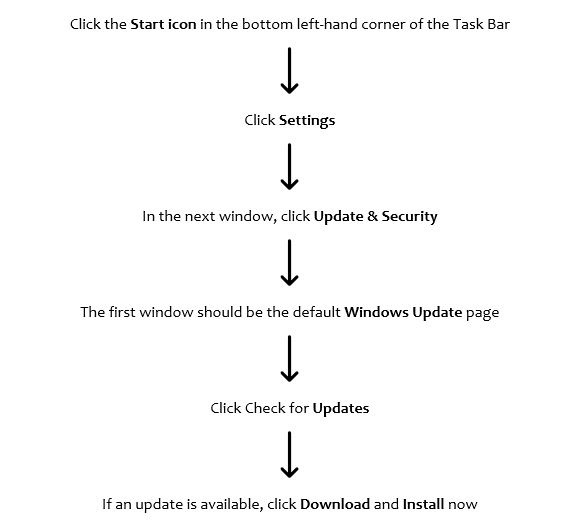
“It is important to install the latest servicing stack update. Updates for Windows RT 8.1 and Microsoft Office RT software are only available via Windows Update. In addition to security changes for the vulnerabilities, updates include defense-in-depth updates to help improve security-related features. Customers running Windows 7, Windows Server 2008 R2, or Windows Server 2008 need to purchase the Extended Security Update to continue receiving security updates,” Microsoft said in a release.
The post Microsoft’s First Patch Tuesday of 2021 is Here! Know Which Flaws are Fixed appeared first on CISO MAG | Cyber Security Magazine.
]]>The post Microsoft Fixes 129 Vulnerabilities in its September Patch Tuesday appeared first on CISO MAG | Cyber Security Magazine.
]]>The most critical ones identified in the Patch Tuesday include:
- SharePoint (CVE-2020-1200, CVE-2020-1210, CVE-2020-1452, CVE-2020-1453, CVE-2020-1576, CVE-2020-1595)
- SharePoint Server (CVE-2020-1460)
- Graphics Device Interface (CVE-2020-1285)
- Dynamics 365 systems (CVE-2020-16857, CVE-2020-16862)
- Media Audio Decoder (CVE-2020-1593, CVE-2020-1508)
- COM for Windows (CVE-2020-0922)
- Text Service Module (CVE-2020-0908)
- Codecs Library (CVE-2020-1319, CVE-2020-1129)
- Camera Codec Pack (CVE-2020-0997)
- Visual Studio (CVE-2020-16874)
Among the vulnerabilities were a crop of RCEs in Microsoft Office products, which particularly concerns students and teachers during the time of COVID-19 and e-learning. “Some of the most severe vulnerabilities in this month’s release include a pair of remote code execution flaws in Microsoft SharePoint and a critical vulnerability in Microsoft Exchange Server. CVE-2020-1210 is a vulnerability in SharePoint due to a failure to check an application package’s source markup. To exploit this flaw, an attacker would need to be able to upload a SharePoint application package to a vulnerable SharePoint site. This vulnerability is reminiscent of a similar SharePoint remote code execution flaw, CVE-2019-0604, that has been exploited in the wild by threat actors since at least April 2019,” stated Satnam Narang, Staff Research Engineer at Tenable, in a recent release to CISO MAG.
He added, “CVE-2020-1576 is another SharePoint flaw patched this month that’s also similar to CVE-2020-1210.CVE-2020-16875 is a memory corruption vulnerability in Microsoft Exchange Server due to improper handling of objects in memory. Exploitation of this flaw would simply require an attacker to send a malicious email containing the exploit code to a vulnerable Exchange server. This vulnerability would allow the attacker to run arbitrary code, which could grant them access to create new accounts, access, modify or remove data, and install programs.”
System administrators are advised to review the threat posed by RCE vulnerabilities as they could be exploited on Windows or SharePoint to corrupt or erase system data.
The post Microsoft Fixes 129 Vulnerabilities in its September Patch Tuesday appeared first on CISO MAG | Cyber Security Magazine.
]]>